Menu

Learn how to join our server
and start playing in 60 seconds
Play Now
CLICK TO JOIN JOIN OUR DISCORD
0
0

Skyblock dream bug (cant connect)

Status
Not open for further replies.

GXSG

New Member
Joined
October 5, 2021
Messages
2
Points
1
Age
22
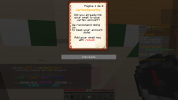
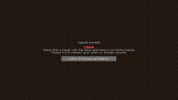
So I was playing minecraft skyblock dream discovering new things and went to /warps and choosed CostumEnchantments, there i saw 2 guys, the tinkerer and the enchanter. I clicked on the tinkerer and suddently i went to the main hub and couldn't connect anymore to skyblock dream server. Any time i tried to click on it it would lead me directly to main hub. So I asked my friend to click on it to, and now we both have the same problem. Can someone help us with that? Sometimes when I try to click on it, it appears a message saying, a user with ur username is currently playing, while this happened to me and my friend.

Hope someone can help with that or atleast fix it.
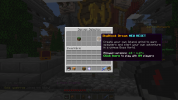
 

Attachments

  • 2021-10-05_14.43.14.png
    2021-10-05_14.43.14.png
    983.1 KB · Views: 2
  • 2021-10-05_14.44.35.png
    2021-10-05_14.44.35.png
    105.7 KB · Views: 2
  • 2021-10-05_14.43.20.png
    2021-10-05_14.43.20.png
    137.9 KB · Views: 2
  • 2021-10-05_14.44.39.png
    2021-10-05_14.44.39.png
    110.1 KB · Views: 2
Solution
Sometimes when I try to click on it, it appears a message saying, a user with ur username is currently playing, while this happened to me and my friend.
This shouldn't be a bug afaik. Should be solved if you restarted your Wi-Fi router once, it's just you accidently double clicked the icon so the server thinks, there's two people with same name, and kicks one. Just restart Wi-Fi and it should be fine. Or just ask a helper+ staff to kick you from game, and you can rejoin.
Hope it works :)
Sometimes when I try to click on it, it appears a message saying, a user with ur username is currently playing, while this happened to me and my friend.
This shouldn't be a bug afaik. Should be solved if you restarted your Wi-Fi router once, it's just you accidently double clicked the icon so the server thinks, there's two people with same name, and kicks one. Just restart Wi-Fi and it should be fine. Or just ask a helper+ staff to kick you from game, and you can rejoin.
Hope it works :)
 
Solution
Community Assistance - Solved

Hello, GXSG!​
Your question and/or concern has been solved, feel free to contact a member of the staff team, or post your question in this same sub-forum if you ever require assistance in the future.​
Thank you for being part of the JartexNetwork community.​

Kind Regards,​
~ SabitTSDM07
 
Status
Not open for further replies.

Top